Filing Documents & Exhibits
Free · 4 min read
Browse the full document set of any SEC filing — primary document, exhibits, and XBRL financial sections — without leaving edgar.tools. Open a filing from the live stream, switch attachments inline, and drill into XBRL financial sections when the filing has structured data.
What it does#
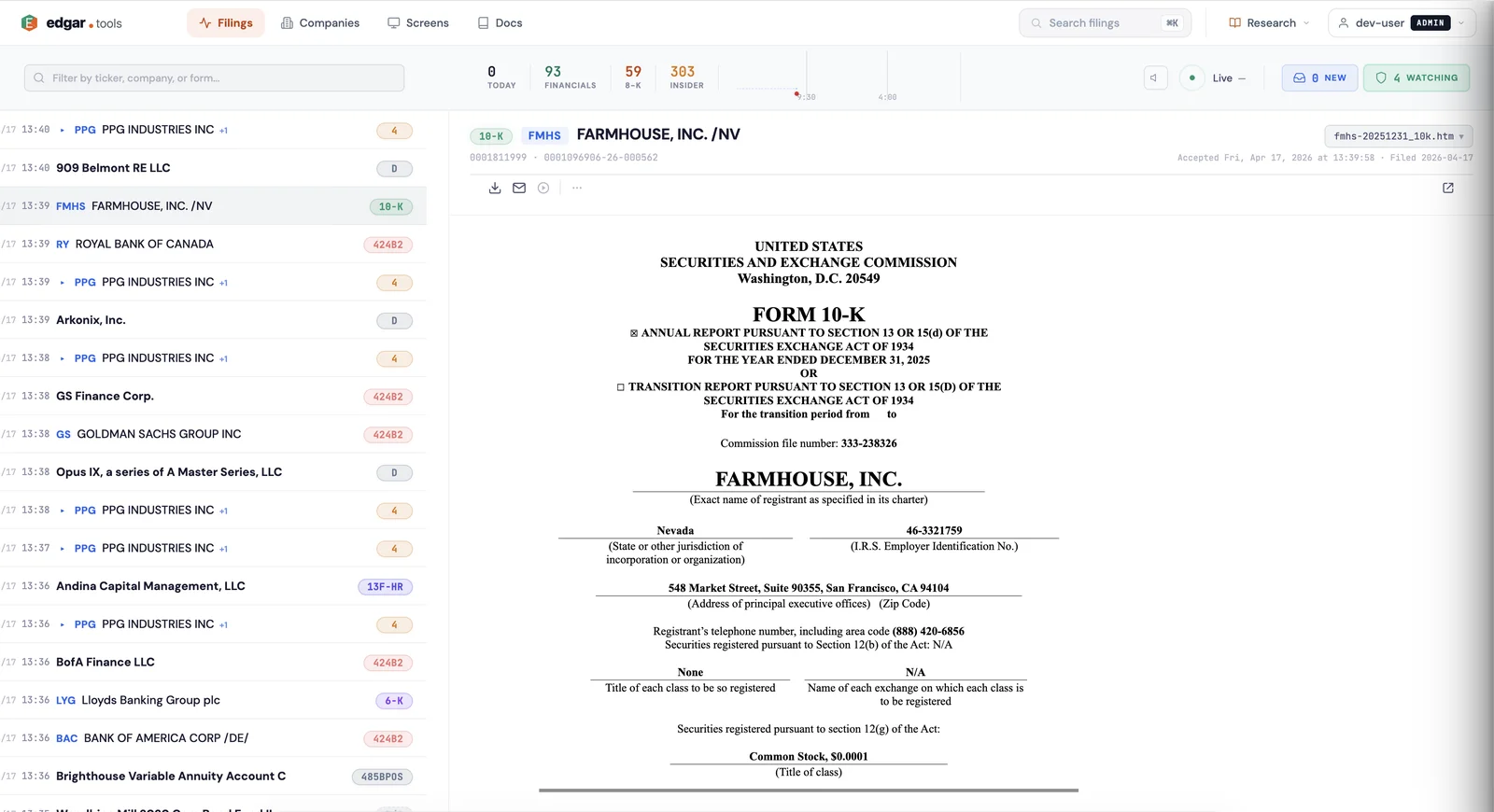
Every SEC filing is a bundle of documents: the primary submission, supporting exhibits (material contracts, certifications, press releases), and — for filings with XBRL — structured financial sections. edgar.tools surfaces all of them inline. Open a filing from the live stream, pick an attachment from the document picker, and read it directly in your browser. For 10-K, 10-Q and other XBRL filings, a separate XBRL sections drawer lets you jump straight to a specific financial statement, note, or detail schedule.
Why it matters#
On SEC EDGAR, a filing's documents appear as a flat list of filenames like R2.htm, R17.htm, and ex10-32.htm — no labels, no grouping, no preview. Each click takes you to a separate page. To find one specific exhibit or financial statement, you click through dozens of unlabeled files and hope you guess right.
edgar.tools labels every attachment by exhibit type (EX-10 → "Material contract", EX-31.1 → "CEO certification") and parses the XBRL FilingSummary to expose individual financial sections by category (Cover / Statements / Notes / Policies / Tables / Details). One click renders the document or section inline, no jumping between pages.
How it works#
Open a filing from the live stream#
Open the Filings page and click any row to open the filing in the right-hand viewer. The viewer loads with the primary document or — for filings with structured data (Form 4, DEF 14A, 13F-HR) — an "Extracted data" overview.
Pick an attachment from the document picker#
The document picker (above the viewer) lists every attachment in the filing. Each row shows:
- Type badge — the SEC document type (e.g.
10-K,EX-10,EX-31.1,JSON) - Filename — the original SEC filename
- Label — a human-readable description for known exhibit types (
EX-10→ "Material contract",EX-21→ "Subsidiaries",EX-31.1→ "CEO certification (302)", and ~25 others) - Size — the document size
Click any attachment to render it in the viewer. The picker also includes a "View on SEC" link at the end that opens the filing index on EDGAR.
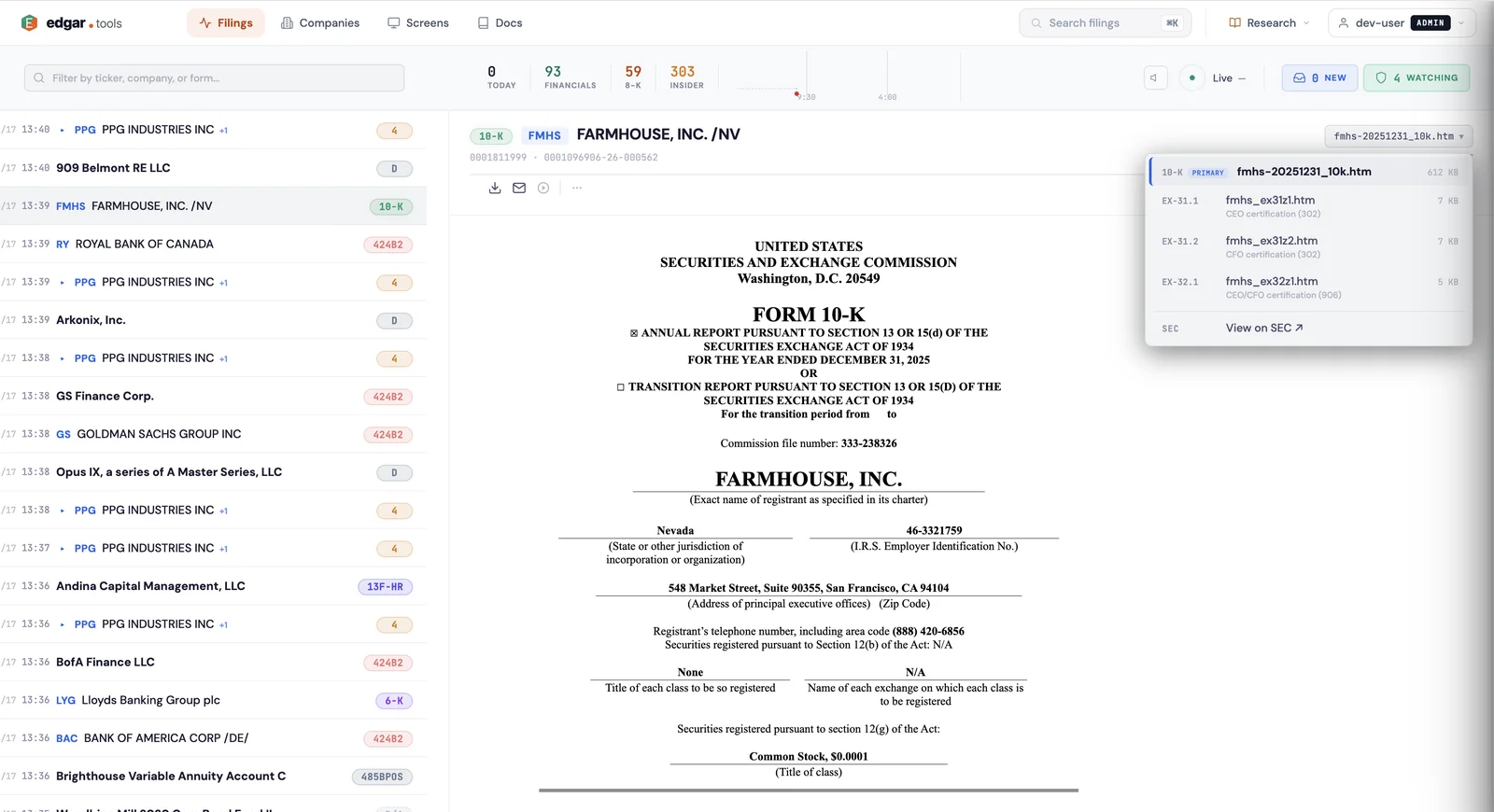
Infrastructure files (R*.htm XBRL render files, FilingSummary.xml, MetaLinks.json, XBRL schema/calc/def/lab/pre files, ZIP exports) are filtered out of the picker so the list stays focused on documents you'd actually want to read.
Drill into XBRL sections (10-K / 10-Q and similar)#
When a filing has XBRL data, a "View" button appears next to the picker. Click it to open the XBRL sections drawer. Sections are grouped into six categories:
- Cover — cover page tags (entity name, ticker, fiscal period)
- Statements — Income Statement, Balance Sheet, Statement of Cash Flows, Statement of Stockholders' Equity, etc.
- Notes — Notes to the Financial Statements (revenue recognition, leases, debt, segment reporting)
- Policies — Significant Accounting Policies
- Tables — Tabular disclosures within notes (maturity tables, fair value hierarchies)
- Details — Detail schedules supporting each note (disaggregated revenue, debt covenant details, lease payment schedules)
Click any section to render it directly in the viewer — no scrolling through 200 pages of the primary document to find one disclosure.
Form-specific overviews#
Some forms get a structured "Extracted data" overview rendered alongside the documents:
- Form 3 / 4 / 5 — Insider transactions table (security, type, shares, price, post-transaction holdings)
- DEF 14A / DEFA14A — Proxy overview (compensation tables, proposals, audit fees)
- 13F-HR — Holdings overview (top positions, total value, holding count)
These overviews surface the structured data without requiring you to read the underlying SGML or XML.
What's inside common filings#
A typical 10-K annual report contains:
- Primary document — the 10-K itself (10-K.htm)
- XBRL sections — 4-8 financial statements + 20-40 notes + 30-50 detail schedules, all browsable via the sections drawer
- Exhibits — material contracts (EX-10), subsidiary lists (EX-21), consents (EX-23), officer certifications (EX-31, EX-32)
- Supplemental — cover page, exhibit list, optional press release
Form 4 insider filings have a single primary XML document plus the structured transactions overview. 13F-HR holdings filings bundle the primary document with the information table XML. DEF 14A proxy statements include the proxy itself plus often a press release exhibit.
Use cases#
Read a specific financial statement without scrolling the full filing. Open a 10-K, click View, switch to the Statements category in the XBRL drawer, click "Consolidated Balance Sheet". You're looking at the exact table in seconds, not page 73 of the primary document.
Find a material contract from an acquisition. Open the company's 10-K, scroll the document picker for EX-10 entries — each shows its exhibit label (e.g., "Material contract"). Click to view inline.
Verify officer certifications. Open the picker, click EX-31.1 for the CEO 302 certification or EX-32 for the SOX 906 statement.
API access#
Filing documents are available through the REST API:
# List documents in a filing
GET https://api.edgar.tools/v1/filings/{cik}/{accession}/documents

# Fetch a specific document
GET https://api.edgar.tools/v1/filings/{cik}/{accession}/{filename}
The document list returns each attachment with its type, filename, sequence number, and size. Document fetches stream the raw content with R2 caching so repeated reads stay fast.
For form-specific structured data, dedicated endpoints return parsed JSON: /ownership for Form 3/4/5, /proxy for DEF 14A, /holdings for 13F-HR.
Availability#
Filing document browsing — picker, inline viewer, exhibit labels, XBRL sections drawer, structured overviews — is available to all logged-in users on the Free tier. No paywall on reading filings.
The REST document API is also available on the Free tier within standard rate limits. See Compare Plans for tier details.