Live SEC Filing Stream
Free · 7 min read
Monitor SEC filings in real-time as they hit EDGAR. Filter by form type or company, click any filing to analyze, and get Professional SSE push updates in one unified timeline.
What it does#
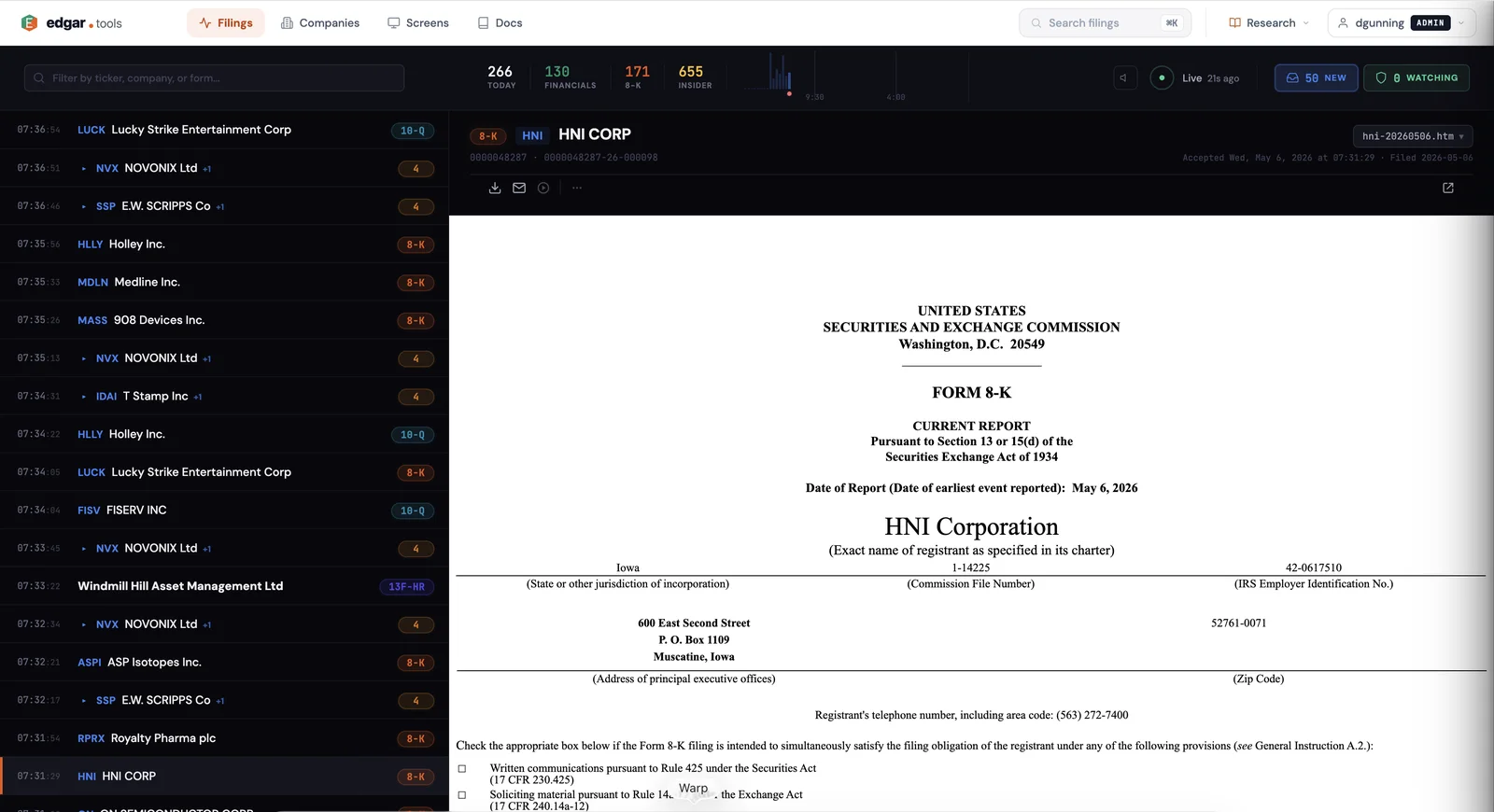
Watch SEC filings arrive in real-time as companies submit them to EDGAR. The filing stream is a unified timeline that merges live filings (captured within seconds of publication) with historical data, so you see everything in one place — no switching between feeds. Filter by form type, search by company name or ticker, and click any row to open a detailed analysis panel without leaving the page.
Professional tier users get Server-Sent Events (SSE) that push new filings into the browser automatically. Free tier users see the same timeline with manual refresh.
Why it matters#
The SEC publishes thousands of filings every business day. Tracking them means either refreshing EDGAR repeatedly, paying for an expensive terminal, or cobbling together RSS feeds that miss filings and lack context. When a company files an 8-K disclosing a CEO departure or a Form 4 revealing insider selling, the analysts who see it first have an edge.
edgar.tools captures filings within seconds of publication and presents them in a browsable, filterable interface. You don't just see that a filing arrived — you can click it to read the full document, view financial statements, or browse attachments, all without leaving the filing stream. The unified timeline means you never wonder whether you're looking at "live" or "historical" data — it's one seamless feed going back as far as you need.
How it works#
Open the filing stream#
Navigate to /filings after logging in. This is the primary landing page for authenticated users. The page loads with the most recent filings from the past 7 days.
Browse the unified timeline#
The left panel displays filings in reverse chronological order — newest at top. Each row shows:
- Time — relative timestamp ("2m ago", "1h ago") that updates live
- Entity — company name and ticker
- Form — filing type badge (10-K, 8-K, 4, etc.) with color coding
Related filings from the same company are grouped together with a visual connector. Click the chevron to expand or collapse grouped filings. Scroll down and more filings load automatically via infinite scroll — no pagination buttons, no page reloads.
Filter by form type or company#
The filter bar at the top accepts ticker symbols, company names, or form types. Type "4" to see only Form 4 insider transactions. Type "AAPL" to see only Apple filings. Type "Tesla" to search by company name.
Filters apply instantly — the timeline updates without a full page reload. The URL updates as you filter, so you can bookmark or share a filtered view like /filings?search=AAPL or /filings?search=8-K.
Real-time updates with SSE (Professional)#
Professional tier users see new filings appear at the top of the timeline automatically — no refresh needed. The browser maintains a persistent SSE connection to the server, which pushes each new filing as it enters the 48-hour cache. New filings slide in with a subtle animation so you can see activity without disrupting your reading position.
The SSE connection respects your active filters: if you're filtered to 8-K filings, only new 8-Ks appear. Free tier users see a banner above the timeline: "Real-time updates available with Professional." The timeline still works — it just requires manual refresh to see new filings.
Click a filing to open the analysis panel#
Click any filing row to open the analysis panel on the right side of the screen. The panel loads the filing's overview — company details, CIK, SIC code, reporting period, fiscal year end, and a link to the original SEC filing. From the overview, you can:
- Switch to the Documents tab to read the full filing inline
- Switch to the Financials tab to view XBRL financial statements (10-K/10-Q)
- Browse attachments — exhibits, notes, certifications — organized by category
- Open the filing on SEC EDGAR with one click
The analysis panel is the same one used across edgar.tools, with specialized views for each filing type — Form 4 insider transactions show a transaction table, 8-K current reports show item descriptions, 13F filings show holdings data.
Search across live and historical filings#
The filter bar doubles as a free-text search. Type a company name, ticker, or form type and the timeline narrows to matching results across both the live cache (last 48 hours) and the historical SEC index. This means you can search for "revenue" and find filings from companies with "revenue" in their name, or type "MSFT" and see every Microsoft filing in the current time window.
What you can monitor#
The filing stream covers every form type the SEC publishes. Common monitoring scenarios include:
- 10-K annual reports — Track when companies file their annual financials, then click through to read income statements, balance sheets, and management discussion
- 10-Q quarterly reports — Same as 10-K but for quarterly filings, useful for tracking sequential revenue trends
- 8-K current reports — Material events: CEO changes, acquisitions, earnings restatements, credit agreement amendments. Often the most time-sensitive filings
- Form 4 insider transactions — CEO and director stock purchases and sales, option exercises, and gift transactions. High volume (thousands per day) but filterable by company
- 13F institutional holdings — Quarterly portfolio disclosures from hedge funds and asset managers. Filed in bulk around quarterly deadlines
- Form D private placements — Exempt securities offerings, useful for tracking startup fundraising and private credit deals
- Proxy statements (DEF 14A) — Shareholder meeting agendas, executive compensation tables, board nominations
API access#
The live filing stream is available through the REST API for programmatic monitoring. See the API reference for full documentation.
import requests

# Get the latest filings
response = requests.get(
    "https://api.edgar.tools/v1/live/filings",
    params={"limit": 50, "form": "8-K"},
    headers={"X-API-Key": "etk_your_key_here"},
)
data = response.json()
filings = data["filings"]
latest_ts = data["latest_timestamp"]

# Poll for new filings since last check
response = requests.get(
    "https://api.edgar.tools/v1/live/filings",
    params={"since": latest_ts},
    headers={"X-API-Key": "etk_your_key_here"},
)
new_filings = response.json()["filings"]
The since parameter enables polling mode — pass the latest_timestamp from your previous response to get only filings that arrived after that point. This is efficient for building real-time monitoring pipelines without re-fetching data you've already seen.
MCP access#
The live filing stream is available as the live_filings tool in the edgar.tools MCP server (Pro tier and above — see MCP Tiers). Connect it to Claude or any MCP-compatible AI assistant to monitor filings conversationally:
"What SEC filings were published in the last hour?" "Show me any 8-K filings from Apple in the past 24 hours"
The MCP tool accepts form type, company CIK, time window (up to 48 hours), and result limit. Without filters, it returns a summary of recent filing activity with notable highlights — useful for a quick "what's happening" check. With filters, it returns individual filings with full metadata.
Use cases#
Catch 8-K material events before the market reacts. Filter the stream to 8-K filings and leave it open during market hours. When a company discloses a CEO departure, acquisition, or earnings restatement, you see it within seconds of the SEC publishing it. Click the filing to read the full text and understand the event before headlines appear.
Monitor insider trading patterns around earnings. Filter to Form 4 filings for a company approaching its earnings date. Watch for unusual buying or selling patterns from officers and directors in the weeks before the announcement. The filing detail panel shows transaction prices, share counts, and post-transaction holdings.
Build a filing alert pipeline with the API. Use the since parameter to poll for new filings every 30 seconds. Filter by form type or CIK to watch specific companies. When a matching filing arrives, trigger your own alerts — Slack messages, email notifications, or automated analysis workflows.
Availability#
The unified filing timeline is available to all logged-in users on the Free tier. Browsing filings, filtering, searching, and clicking into filing details all work without a paid subscription.
Real-time SSE updates — new filings appearing automatically without refresh — require a Professional tier subscription ($24.99/month). Free tier users see a manual-refresh experience with an upgrade prompt.
The REST API for live filings (/v1/live/filings) requires a Professional tier API key. The unified timeline API (/v1/filings) is available on the Free tier.
See Compare Plans for full tier details.