Mutual Funds & ETFs
Free · 4 min read
Browse 17,000+ SEC-registered mutual funds and ETFs at `/funds`. Filter by structure (Open-End, ETF, Closed-End, Variable Annuity, Variable Life), asset class, AUM, fund family, geographic exposure, and concentration. Open any fund to see its share classes and top holdings, sourced directly from the latest N-1A registration and NPORT-P quarterly portfolio.
What it does#
Every mutual fund and ETF that files with the SEC appears in the directory — funds register on Form N-1A and disclose holdings quarterly on NPORT-P. The Funds Hub turns those filings into a browsable, filterable directory. Sort by AUM, narrow to ETFs only, find every fund in the Vanguard family, or screen for funds with concentrated portfolios — all without leaving the app.
How it works#
Browse the directory#
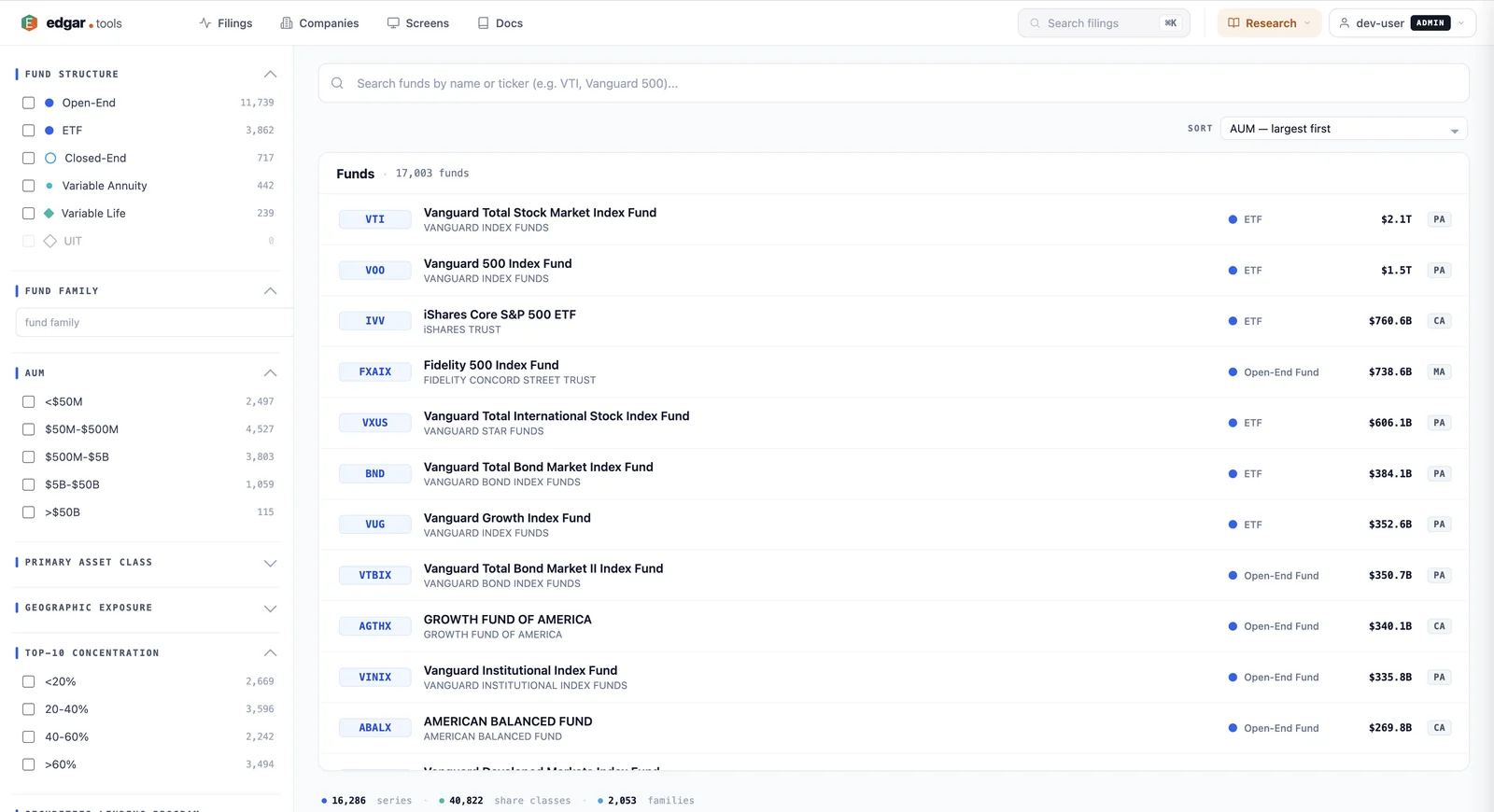
The directory page at `/funds` shows every registered fund the SEC has on file — 16,000+ series across 40,000+ share classes, organized into 2,000+ fund families. Search by name or ticker, then narrow with the facet filters on the left:
- Fund Structure — Open-End (the standard mutual fund form), ETF, Closed-End, Variable Annuity, Variable Life, UIT
- Fund Family — type a sponsor name (e.g. Vanguard, Fidelity, iShares) to scope to one family
- AUM — six tiers from <$50M to >$50B
- Primary Asset Class — equity / fixed income / commodities / real estate / etc.
- Geographic Exposure — US-focused vs international vs global
- Top-10 Concentration — what share of the portfolio sits in the top ten holdings; useful for filtering passive (low concentration) vs active (high) strategies
- Securities Lending Program — flag funds that earn revenue lending out portfolio holdings
Filters combine with AND. The fund list re-sorts live as you adjust them.
Open a fund#
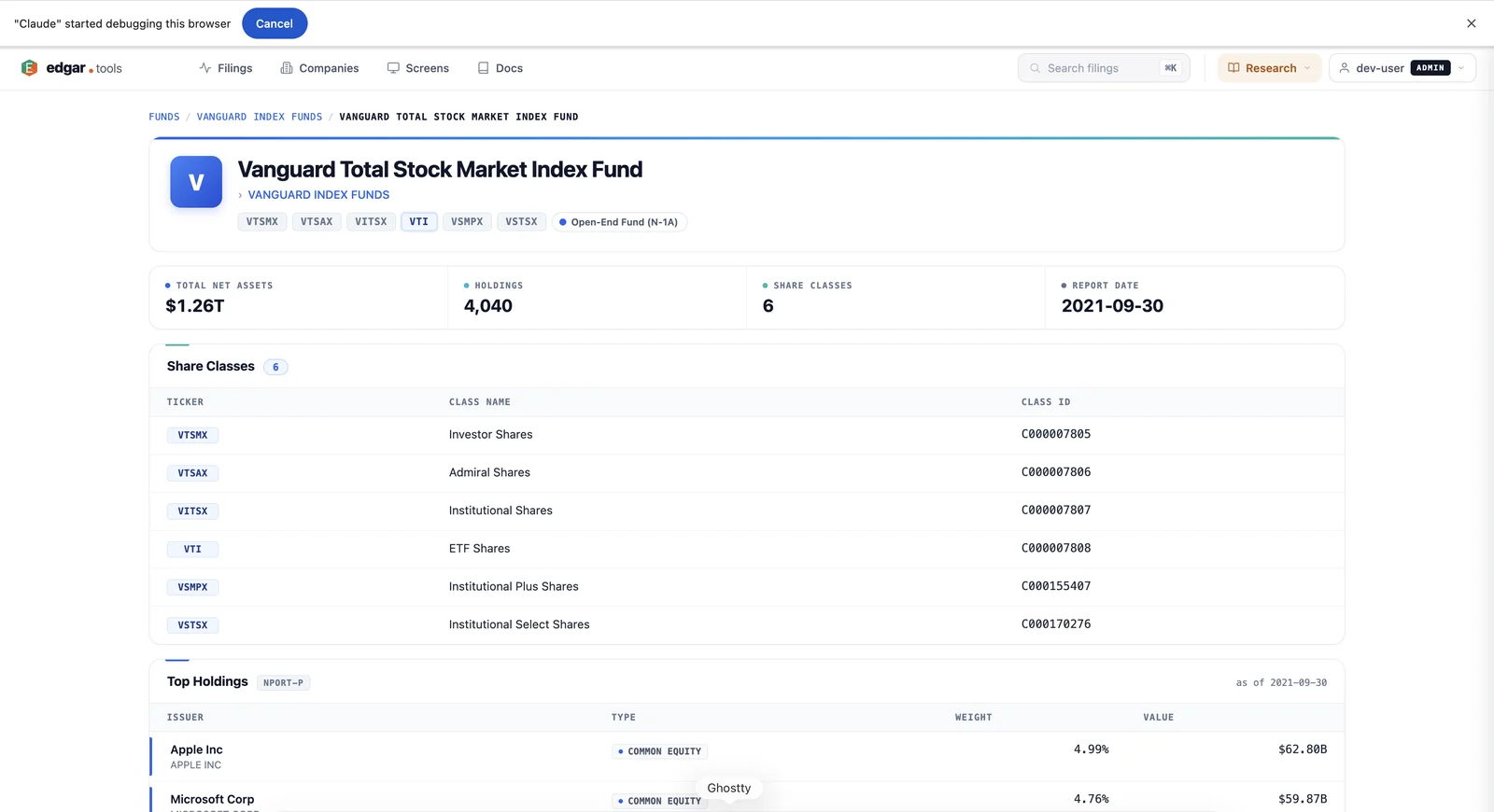
Click any fund row to see its full profile. The header shows the fund name, family, ticker, and structure. Below: total net assets, holdings count, share class count, and the report date of the latest NPORT-P. A share-class table lists every class of the same underlying fund (e.g. VTI's six classes — Investor, Admiral, Institutional, ETF, Institutional Plus, Institutional Select — each with their own ticker but pointing at the same portfolio). The Top Holdings table shows the largest positions by weight, with type, weight percent, and dollar value, sourced from the fund's most recent NPORT-P.
Family pages#
Each fund family has its own landing at /funds/family/{family-id}. The family page lists every fund the family sponsors with AUM rollup, useful for tracking a sponsor's full lineup or comparing similar funds across share-class flavors.
What you can do with it#
Compare share classes. Open VTI and you'll see Investor, Admiral, Institutional, ETF, and Institutional Plus shares all listed — same underlying portfolio, different expense ratios, minimums, and liquidity. The share-class table makes the structure obvious in one glance.
Find every fund holding a specific company. Open the fund profile, scan Top Holdings — or use the REST API to query holdings programmatically across thousands of funds.
Screen for concentrated active managers. Filter to Open-End structure, AUM $500M-$5B, Top-10 Concentration >60%. The result is a slice of mid-size active managers running concentrated portfolios — useful for finding active strategies that aren't disguised index funds.
Track sponsor activity. Open the Vanguard family page to see every Vanguard fund and total AUM under their roof — useful when reading their proxy filings or watching for product launches via N-1A registrations.
Data sourcing#
| What you see | Filing source |
|---|---|
| Fund profile (name, family, structure) | Form N-1A — initial registration & annual updates |
| Total net assets, holdings count | Form NPORT-P — quarterly portfolio disclosure |
| Top holdings | Form NPORT-P — disclosed positions with weight + value |
| Share classes | Form N-1A Part B (each class registered separately) |
| Closed-end fund holdings | Form N-CSR — annual / semi-annual shareholder report |
All values come straight from filings — no third-party data. The "Report Date" on the profile header tells you which NPORT-P (or N-CSR for closed-end) the holdings are sourced from.
API access#
Funds are available through the REST API:
# Search for funds
GET https://api.edgar.tools/v1/funds/search?q=Vanguard

# Get a fund profile
GET https://api.edgar.tools/v1/funds/{ticker_or_series_id}

# Get top holdings from the latest NPORT-P
GET https://api.edgar.tools/v1/funds/{ticker_or_series_id}/holdings
Pass a ticker (e.g. VTI), a CIK (e.g. 0000036405), or an SEC series ID (e.g. S000005637). The MCP server exposes the same data as search_funds and fund_profile tools — see the MCP Tools reference.
Availability#
The Funds Hub directory and fund profile pages are available to all visitors — no account required for browsing. API access requires a Free or paid plan; tier caps follow the standard pattern documented in Authentication.
See Compare Plans for full tier details.