SEC Filing Screens — Filter the Entire EDGAR Universe
Free · 5 min read
Build saved screens that slice the SEC filing universe by form type, exchange, revenue size, and domicile — or watch a specific list of companies like a watchlist. Matching filings arrive in real-time.
What it does#
Screens let you define a persistent slice of the SEC filing universe. Combine company filters (exchange, domicile, revenue size) with filing stream filters (9 form groups covering 30+ form types) into a single saved view — or pin a named list of companies by ticker (a watchlist). Once saved, click "Watch Live" to see only the filings that match your screen in real-time.
Looking for a watchlist? A watchlist is just a screen built from specific companies. Add the tickers you care about in the Specific Companies section (covered below), with or without broader filters. See Watch a list of specific companies.
Why it matters#
The SEC publishes thousands of filings every business day across tens of thousands of companies. If you're an analyst covering NASDAQ large-cap tech, you don't want to scroll through Form D private placements from micro-cap mining companies. If you're tracking insider trading at healthcare firms, you need Form 3/4/5 filings from that sector — not the full firehose.
Before Screens, the only option was to manually filter the filing stream each time you opened edgar.tools. Screens solve this by letting you define your universe once and connect it to a live filing stream permanently. You define the filter, give it a name, and it's always there — one click to watch.
A watchlist is just one shape of screen: instead of (or alongside) sector and size filters, you list the specific companies you want to follow by ticker. The same saved view, the same live stream — scoped to the names on your list.
How it works#
View your screens#
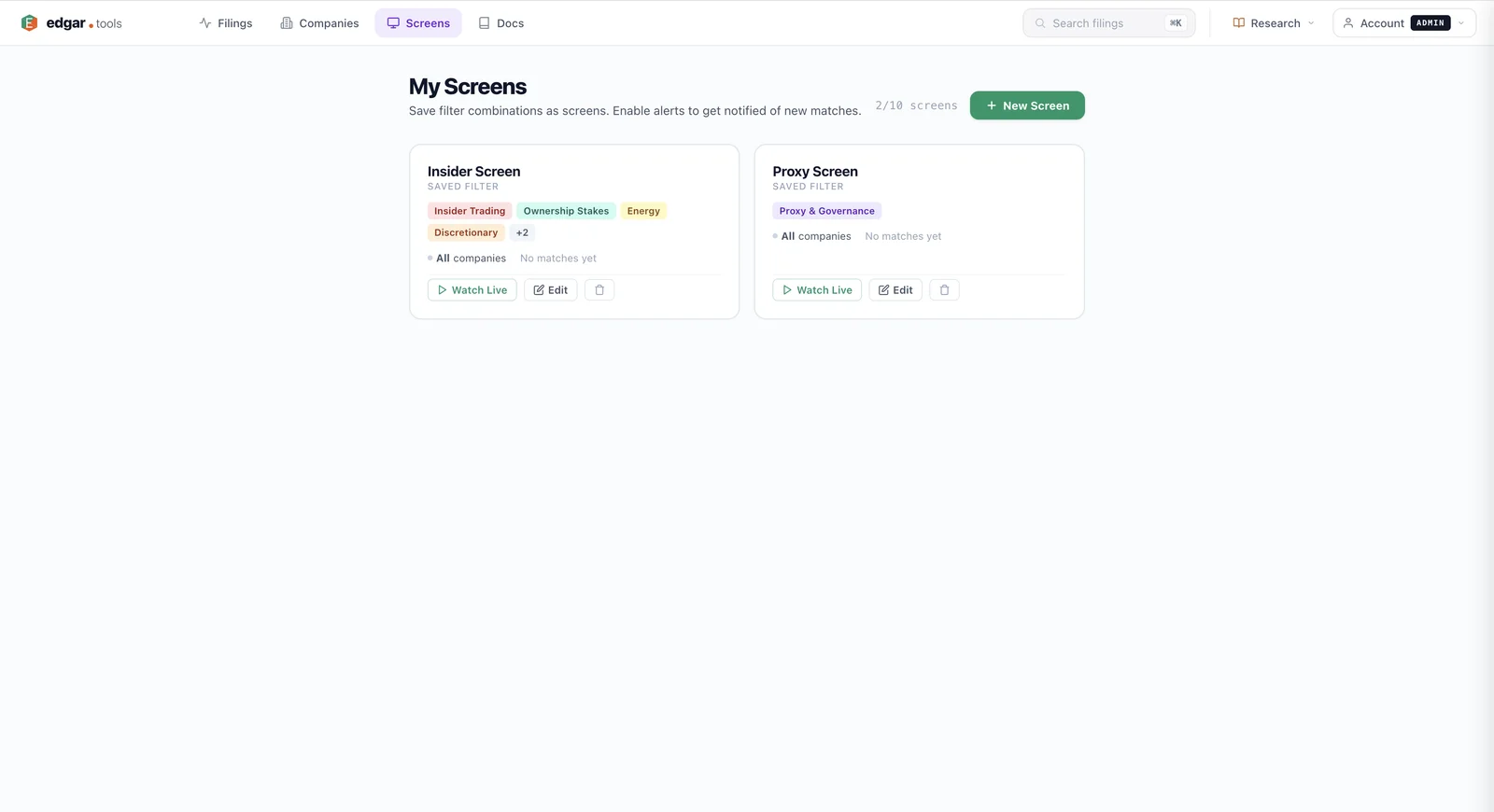
Navigate to /screens after logging in. The My Screens page shows all your saved screens as cards, each displaying the screen name, active filter badges (form groups, exchanges, domicile, revenue size, specific companies), resolved company count, and action buttons. The counter in the top right shows your usage against the 10-screen limit (e.g., "2/10 screens").
Create a new screen#
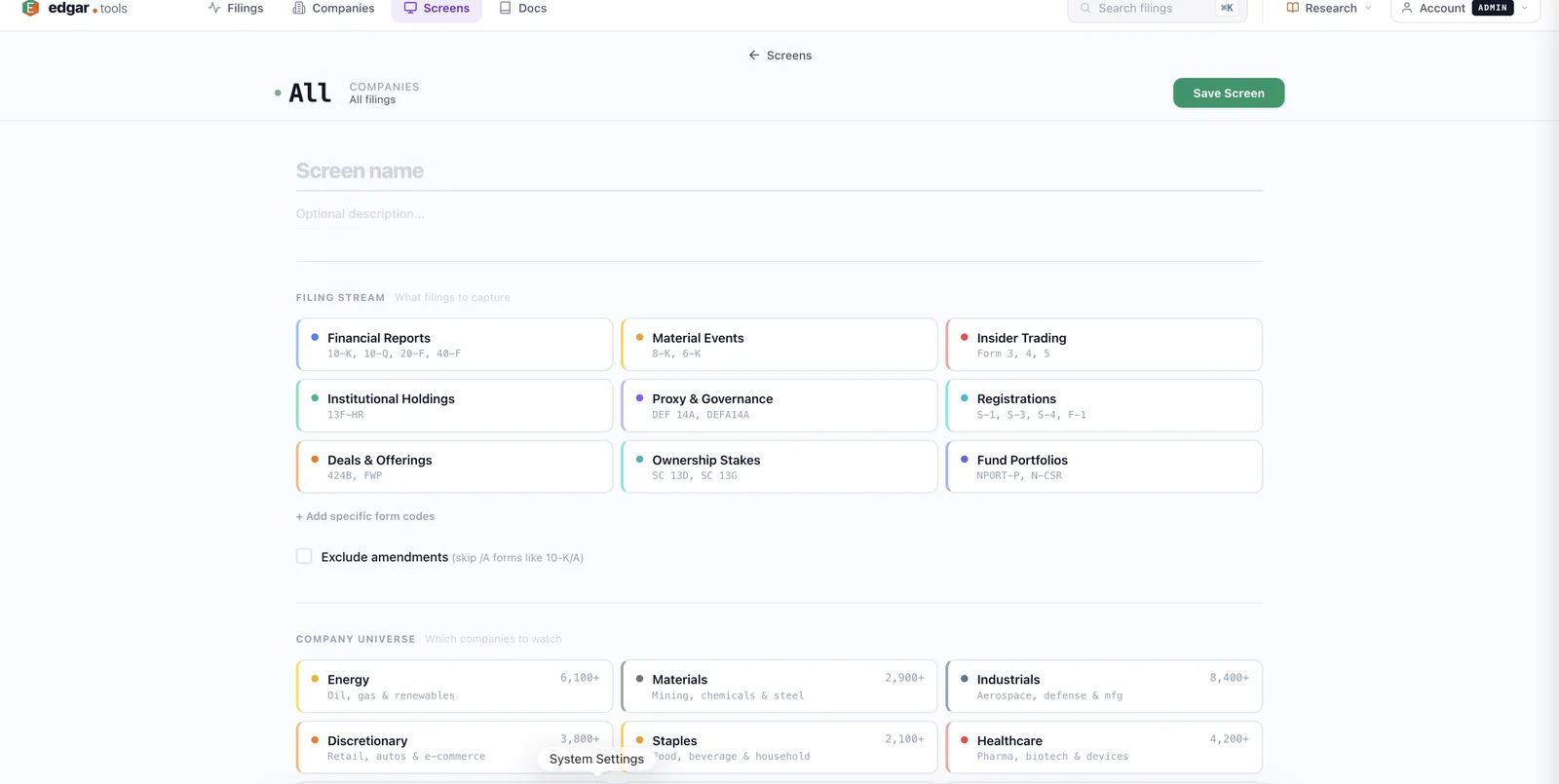
Click + New Screen to open the screen builder. The builder is organized into five sections, with a sticky sidenav on the left that jumps to each one and shows how many filters you've set per section:
- Filing Stream — What filings to capture. Choose from 9 form groups (Financial Reports, Material Events, Insider Trading, Institutional Holdings, Proxy & Governance, Registrations, Deals & Offerings, Ownership Stakes, Fund Portfolios) or add specific form codes. Toggle "Exclude amendments" to skip /A forms.
- Company Universe — Which companies to watch by category. Filter by stock exchange, US/international domicile, and tradeable-only.
- Specific Companies — A named list of companies by ticker or CIK (the watchlist pattern). These combine with the Company Universe filters by UNION — see the section below.
- Financial — Filter by revenue size (TTM). Five bands: Mega ($200B+), Large ($10B–$200B), Mid ($2B–$10B), Small ($50M–$2B), Micro (<$50M).
- Alerts — How you're notified of new matches: in-app notifications and a daily email digest.
The sticky preview header at the top updates live as you select filters, showing the resolved company count and a summary of your active filters. When you're ready, name your screen and click Save Screen.
Watch a list of specific companies (watchlists)#
To track a curated list of names — the way you'd use a watchlist — open the Specific Companies section and type a ticker or CIK, then press Enter (or comma). Each entry resolves to a chip showing TICKER · Company Name. Unknown tickers surface an inline error so you can fix the typo before saving.
Specific Companies combine with the Company Universe and Financial filters by UNION, not AND. A screen with the NYSE exchange plus AAPL and MSFT returns every NYSE company plus Apple and Microsoft (both NASDAQ-listed). If you add only specific companies and no other filters, the screen resolves to exactly that list — a pure watchlist.
Tickers are resolved to CIKs when you save, so a screen keeps tracking the right company even if a ticker symbol later changes.
Edit an existing screen#
From the My Screens page, click Edit on any screen card. A slideout panel opens with the screen's current filters pre-selected, the preview header showing the company count and active filter chips, and the full builder form for making changes. Make your changes and click Update to save.
Watch the live filing stream#
Click Watch Live on any screen card to open a filtered filing stream that shows only filings matching your screen's criteria. The stream applies both your company universe filter (only companies matching your sector/exchange/domicile/cap selections) and your filing type filter (only the form types you selected).
The filtered stream works exactly like the main filing stream — click any filing to open the analysis panel, see related filings grouped together, and get real-time SSE updates (Professional tier).
What you can screen for#
Filing types (9 groups)#
| Group | Forms included |
|---|---|
| Financial Reports | 10-K, 10-Q, 20-F, 40-F |
| Material Events | 8-K, 6-K |
| Insider Trading | Form 3, 4, 5 |
| Institutional Holdings | 13F-HR |
| Proxy & Governance | DEF 14A, DEFA14A |
| Registrations | S-1, S-3, S-4, F-1 |
| Deals & Offerings | 424B2, 424B3, 424B4, 424B5, FWP |
| Ownership Stakes | SC 13D, SC 13G |
| Fund Portfolios | NPORT-P, N-CSR |
You can also add individual form codes beyond these groups for precise control.
Company universe dimensions#
- Exchanges — NYSE, NASDAQ, AMEX, or any combination
- Domicile — All, US only, or International only
- Tradeable only — Restrict to companies with active ticker symbols
- Revenue size (TTM) — Mega ($200B+), Large ($10B–$200B), Mid ($2B–$10B), Small ($50M–$2B), Micro (<$50M). Classified on trailing-twelve-month revenue from XBRL. (Set in the Financial section.)
- Specific companies — An explicit list by ticker or CIK (set in the Specific Companies section)
Category dimensions combine with AND logic: selecting "NASDAQ + US + Large" returns only companies that are on NASDAQ AND US-domiciled AND in the Large revenue band. Specific companies are added on top by UNION (see above).
Coming soon: Sector and Investment Strategy filters appear in the builder but are not yet applied when a screen resolves — selecting them today has no effect on your matches. Use exchange, domicile, revenue size, and specific companies to scope your universe in the meantime.
Use cases#
Watch your portfolio (a watchlist). Add Material Events and Insider Trading to the Filing Stream, then list your holdings by ticker in the Specific Companies section — AAPL, MSFT, NVDA, and so on. Watch Live to see every 8-K and Form 4 from exactly the companies you own, and nothing else.
Track insider trading at large-cap firms. Create a screen with the Insider Trading form group, NASDAQ exchange, and the Large revenue band. Watch Live to see every Form 4 filed by officers and directors at the largest NASDAQ-listed companies — without the noise from thousands of small-cap insider filings.
Monitor 8-K material events from your coverage universe. If your coverage is a fixed list of names, add Material Events to the Filing Stream and list those companies under Specific Companies. When one of them discloses a CEO departure, acquisition, or earnings restatement, you see it immediately.
Build an IPO pipeline tracker. Select the Registrations form group (S-1, S-3, S-4, F-1) with no company filters. Every new registration statement from any company appears in your stream — useful for tracking the IPO pipeline and secondary offerings across the entire market.
Availability#
Saving screens requires a Professional plan or higher. Free accounts can browse the screen builder and preview company counts, but saving and the Watch Live stream require an upgrade.
- Free tier — Preview the builder; saving is gated.
- Professional tier ($24.99/month) — Up to 10 saved screens with Watch Live filtered streams.
- Analyst tier ($79.99/month) — Up to 10 saved screens, plus webhook delivery for screen matches.
- Enterprise tier — Custom limits. Contact sales.
See Compare Plans for full tier details.