Search SEC Filings — by Text, Entity, Disclosure, and Time
Search is one surface with four modes. Find a phrase inside the body of any filing, resolve a company by ticker, read the narrative disclosures inside a 10-K, or chart how often a term shows up over time. Every mode is available in the web app, the REST API, and through MCP for AI assistants.
Pick the mode that matches the question you're asking:
| Mode | Answers | Where | Tier |
|---|---|---|---|
| Full-text | "Which filings mention this phrase?" | /search, GET /v1/search/full-text, search_filings | Pro+ |
| Entity | "Take me to this company / fund / adviser." | Cmd+K, GET /v1/search, search_companies | Free |
| Disclosure | "What does the 10-K narrative say about this?" | /disclosures, GET /v1/companies/{cik}/disclosures/search, disclosure_search | Analyst+ |
| Trend | "How often is this phrase filed over time?" | search_filings (interval + periods), API | Pro+ |
The rest of this page covers each mode in turn.
Full-text search#
Full-text search scans the body of every SEC filing since 2001 across 400+ form types — 10-Ks, 8-Ks, S-1s, proxy statements, and the rest — not just company names or financial line items. Open /search in the web app, or call GET /v1/search/full-text.
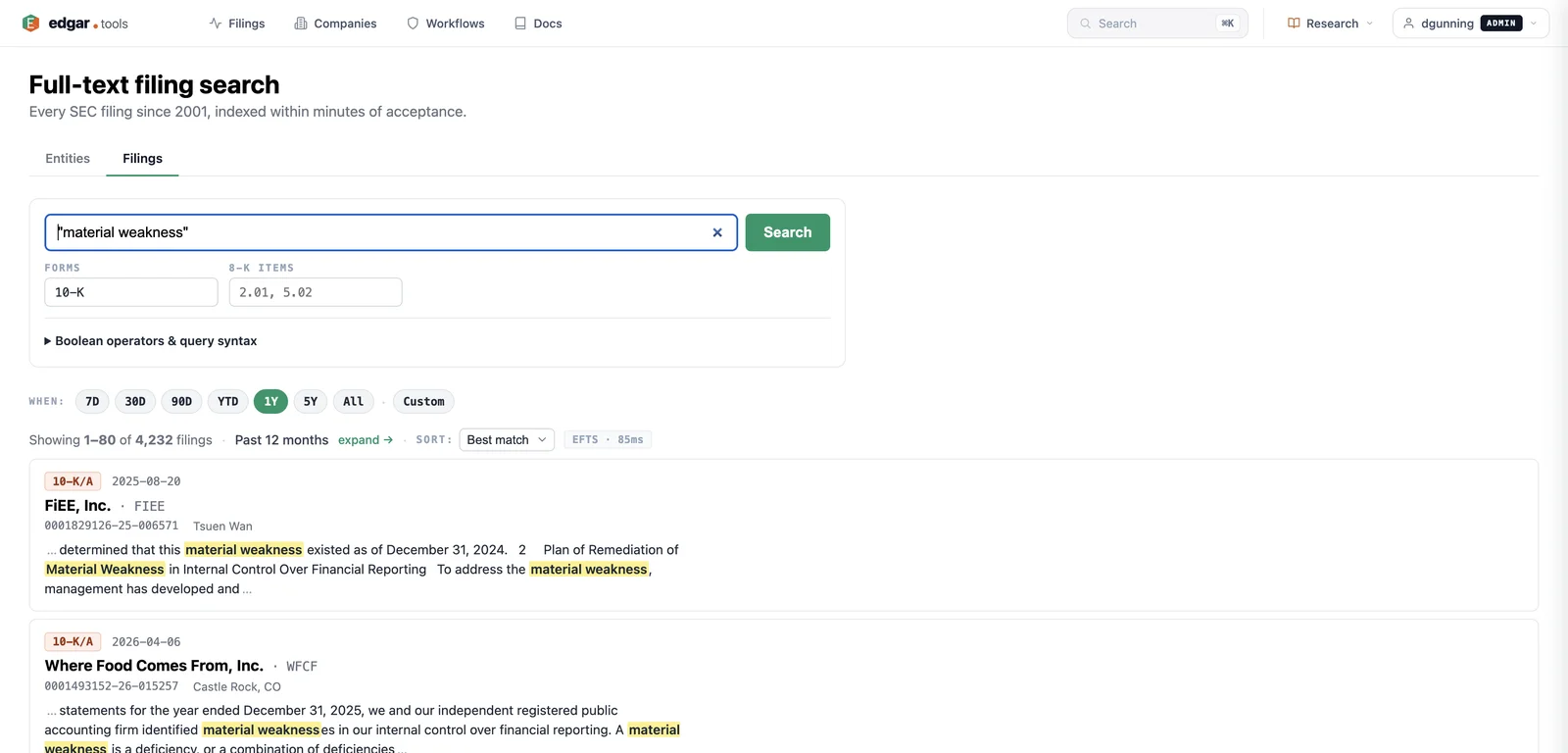
Available on Professional and above. Free accounts can use entity search (below) at no cost; full-text returns 403 until you upgrade. See the pricing page.Query operators#
The q parameter supports four operators, which you can combine:
| Syntax | Example | Meaning |
|---|---|---|
| Phrase quotes | "material weakness" | Exact phrase match |
| Boolean | revenue OR earnings, gas NOT renewable | OR / NOT (AND is implicit between bare terms) |
| Proximity | NEAR(revenue, decline, 5) | Two terms within N tokens of each other |
| Suffix wildcard | gas* | Prefix match — gas, gases, gasoline, … |
Form codes are case-sensitive when used as terms (10-K, not 10-k).
Filters#
Narrow a query by form type, company, date range, and 8-K item code:
- `forms` — one or more SEC form types (
10-K,8-K, …) - `ciks` — restrict to specific companies by CIK (zero-padding optional)
- `date_from` / `date_to` — bound the filing date window (
YYYY-MM-DD) - `items` — 8-K item codes (e.g.
2.02,5.02), meaningful only withforms=8-K
Each result comes back with a highlighted snippet of the matched passage, so you see why a filing matched without opening it.
Results are grouped by filing#
SEC's underlying index returns one hit per matching document, so a filing that mentions your phrase in three exhibits would otherwise appear three times. edgar.tools collapses those into one row per filing — it picks the best-matching document for the snippet and unions the matched exhibits. You see filings, not duplicate exhibit rows, across the web app, the API, and MCP.
Result counts are document counts. Thetotalan API response reports is the number of matching documents, not the number of distinct filings shown after grouping. A filing that matched in N documents contributes N tototal. Treattotalas a relevance signal and page through the results to count distinct filings.
Example#
# Every 10-K since 2024 mentioning "material weakness"
curl "https://api.edgar.tools/v1/search/full-text?q=%22material+weakness%22&forms=10-K&date_from=2024-01-01&size=5" \
  -H "Authorization: Bearer etk_your_key_here"
For the complete parameter and response reference, see Search & Browse API.
Entity search#
Entity search resolves a company, fund, or adviser by name, ticker, or CIK and takes you straight to it — no full-text query, no filters. It's the fastest way to navigate.
In the web app, press Cmd+K (or /) anywhere to open the command palette, type AAPL or Apple or 320193, and jump to the company page.
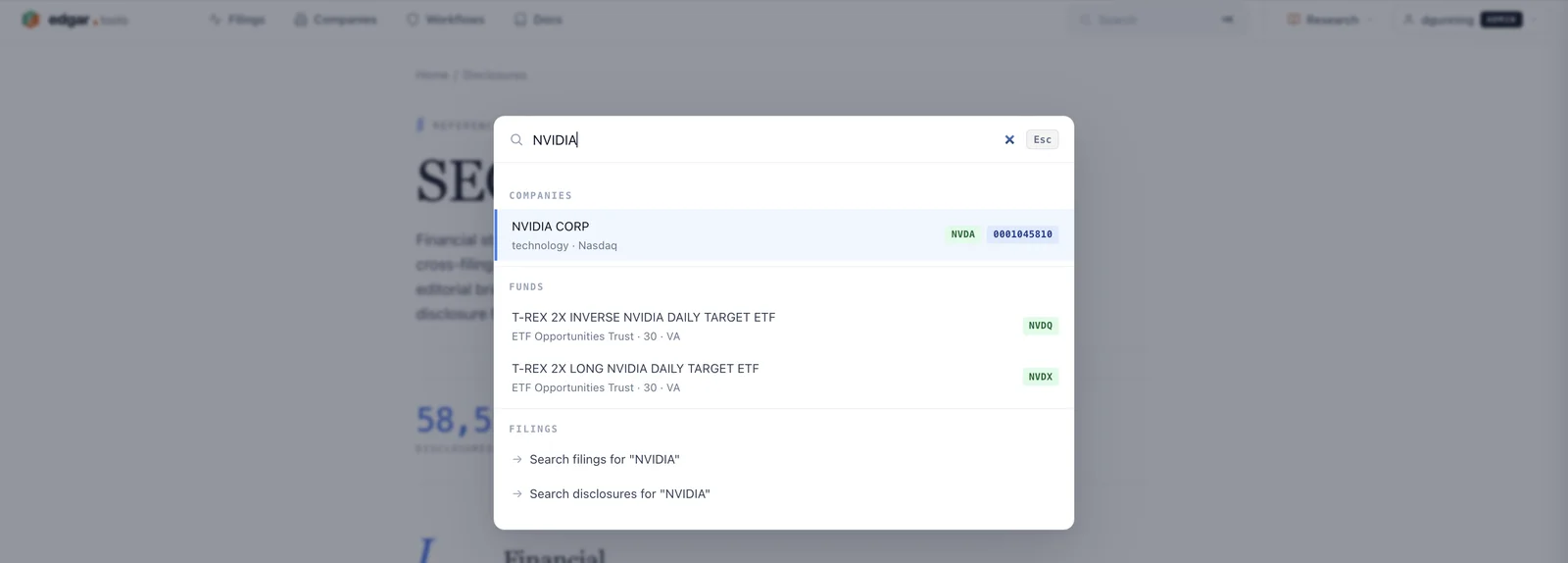
The same resolution is available programmatically:
curl "https://api.edgar.tools/v1/search?q=Apple" \
-H "Authorization: Bearer etk_your_key_here"{
"entities": [
{
"cik": "0000320193",
"name": "Apple Inc.",
"ticker": "AAPL",
"entity_type": "company",
"sic_description": "Electronic Computers"
}
],
"total": 1,
"query": "Apple"
}The CIK in the response is the identifier you pass to every other endpoint. Entity search — Cmd+K, GET /v1/search, and the search_companies MCP tool — is available on every tier, including Free.
Disclosure search#
Disclosure search is scoped to the structured narrative disclosures inside 10-K and 10-Q filings — revenue recognition policies, risk factors, segment detail, lease accounting, and every other XBRL text-block. Because those disclosures are tagged and tracked across years, this mode can do things full-text can't: compare the same disclosure across annual reports and score how much the language changed. The /disclosures page indexes tens of thousands of these notes across thousands of public companies, organized into XBRL topics you can browse.
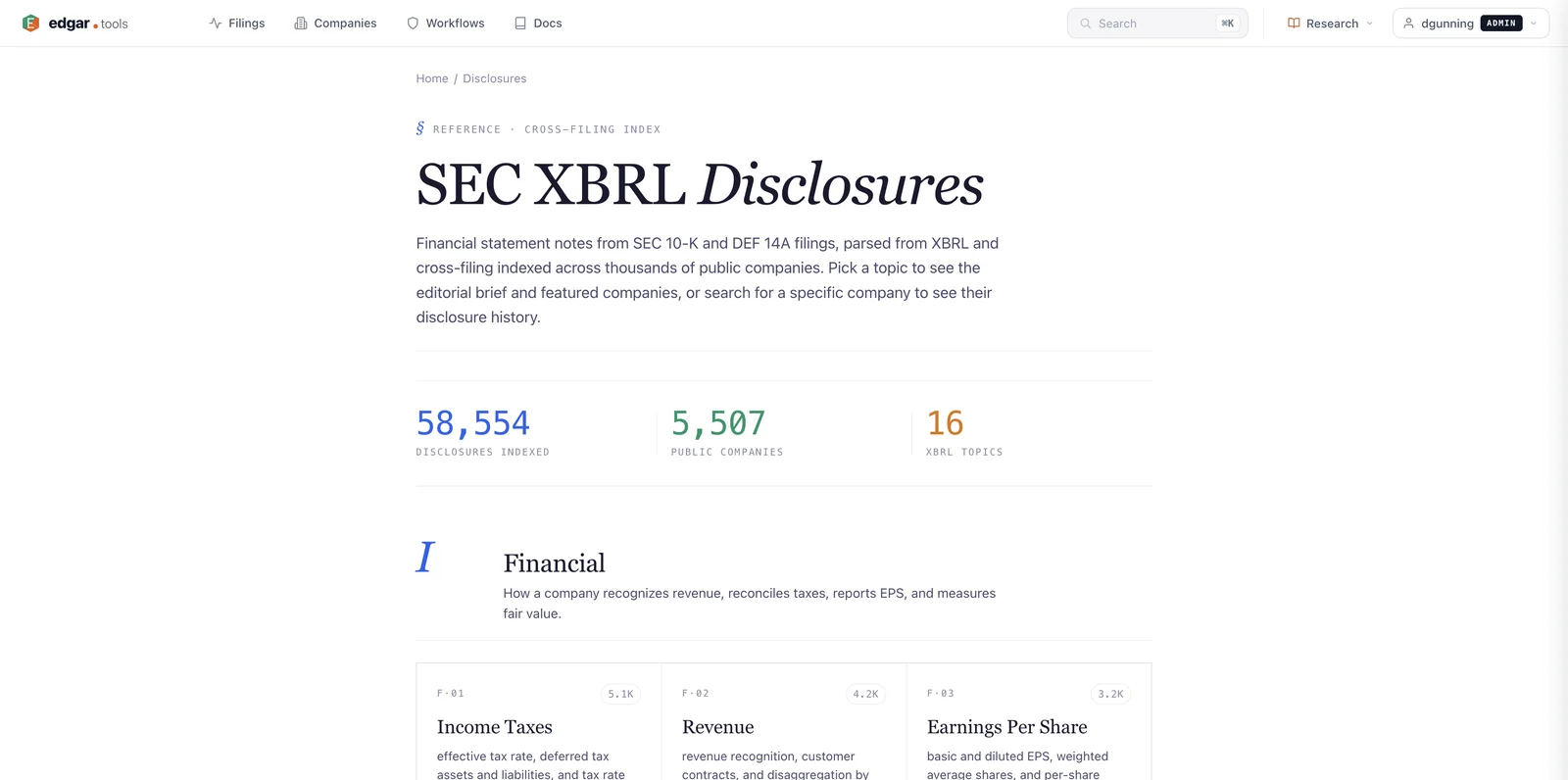
Available on Analyst and above. Free accounts see a 3-result teaser with truncated snippets.
What disclosure search adds over plain full-text:
- Browse by Topic — curated XBRL topic cards (Income Taxes, Revenue, Earnings Per Share, Fair Value, Leases, Segments, …) that surface every disclosure year in one timeline
- Novelty scoring — 0.0 (boilerplate, unchanged year over year) to 1.0 (entirely new language)
- Diff-only filtering — show only the disclosures that changed versus a prior year
- Proximity search — multi-word queries matched within a configurable token distance
- Smart query expansion — 60+ acronym/synonym mappings and 20+ accounting-standard cross-references (
revenue recognition↔ ASC 606,lease↔ ASC 842)
# Risk-factor language in Apple's 10-K that's new versus the prior year
curl "https://api.edgar.tools/v1/companies/0000320193/disclosures/search?q=risk+factors&form=10-K&diff_only=true" \
  -H "Authorization: Bearer etk_your_key_here"
For the full parameter table and the web Browse-by-Topic walkthrough, see the Disclosures guide.
Trend search#
Trend search answers a different shape of question: not which filings match, but how many, over time. Give full-text search an interval and a number of periods and it returns a count-over-time series instead of hits — one count per calendar window.
- `interval` —
day,week,month,quarter, oryear - `periods` — how many windows to count back from
date_to(default today); capped at 6 (Free) / 24 (Pro+)
Example: "How many 8-Ks mentioned 'restructuring' each month over the last 12 months?" → interval: month, periods: 12 returns a series[] of { start, end, count }. As with full-text, the counts are document counts (a filing matched in N documents counts N times).
Trend search runs through the search_filings MCP tool and the API. See MCP Tools → search_filings.
Tier and limits#
Full-text and trend search are Professional+; entity search is available on every tier. Per-tier full-text result ceilings (how deep you can paginate) and trend window counts:
| Tier | Full-text max paginated results | Trend periods |
|---|---|---|
| Free | — (full-text gated) | 6 |
| Professional | 500 | 24 |
| Analyst | 1,000 | 24 |
| Enterprise | 10,000 (EFTS hard cap) | 24 |
See Compare Plans for full tier details.
Related#
- Disclosures — XBRL narrative search with novelty and diff
- Search & Browse API — REST reference for
/v1/searchand/v1/search/full-text - MCP Tools —
search_companies,search_filings,disclosure_search - Live Filing Stream — real-time filings as they arrive